Level measurement using a single radar sensor
Radar sensors determine the level via distance measurement, thereby enabling contactless measurement.
|
Mounting situation |
|
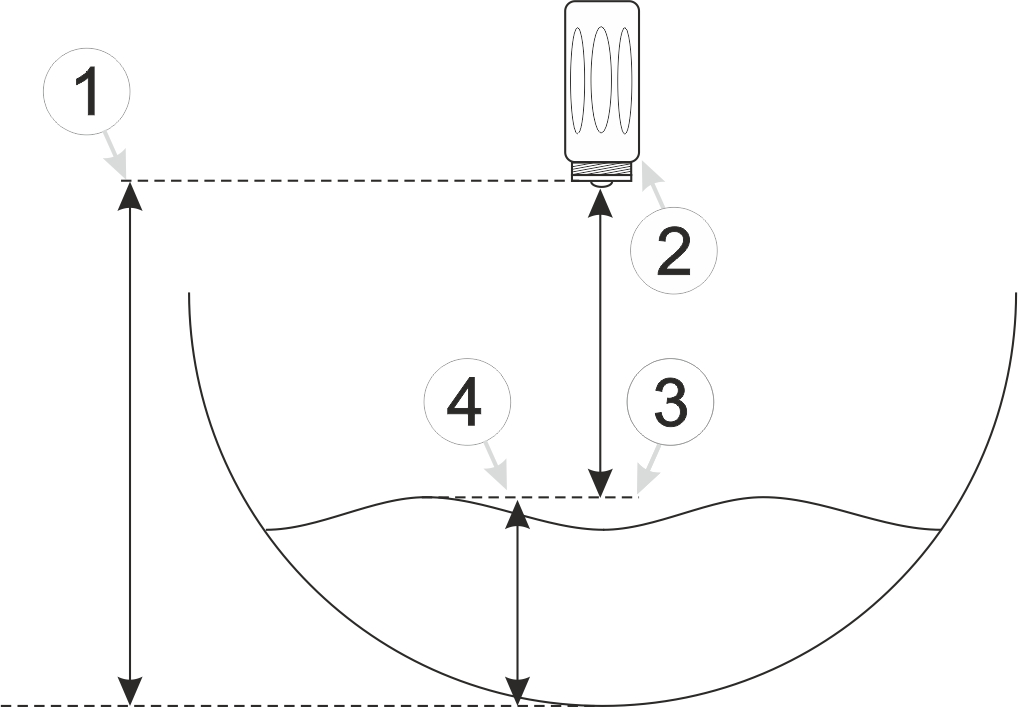
The first step is only necessary if you wish to use a radar sensor with a Modbus interface
- Enable the Modbus interface and select the settings for the interface to match your sensors (see Device settings , tab "Interfaces").
- Enable the sensor supply, select the voltage level and the duration for which the sensor supply is switched on prior to measurement in accordance with your sensor (see Device settings , tab "Sensor supply")
- Configure the measurement channel that will be used to record the sensor value. You can
use one of the 3
Modbus measurement channels or one of the 2 universal inputs for this purpose.
You should configure the following settings if you wish to use a Modbus measurement channel (see Sensor settings):
- Use "Radar" name for the measurement channel (recommended)
- Set the "Mode" to "On" to activate the measurement channel.
- Select "Distance" for the "Type"
- Configure "Slave address", "Modbus address" and "Function" in such a way that the measurement value can be read from the sensor.
You should configure the following settings if you wish to use a universal input (see Universal channel):
- Use "Radar" name for the measurement channel (recommended)
- Set the "Mode" to "0-20 mA" or "4-20 mA" to activate the measurement channel.
- Select "Distance" for the "Type"
- Configure the scaling via the "0 mA" and "20 mA" fields.
- Make sure that "Offset" and "Trimming" are set to 0
- Configure the sub level that you wish to use (see Sub Level settings).
- Use "Level - Distance" as name for the sub level (recommended)
- Select the setting "Distance" for the "Mode"
- Select the measurement channel configured in step 3 (i.e. "Radar") from the dropdown list "Sensor List"
- Enter the mounting height in the appropriate field
- Make sure that the other sub level is disabled.
- Configure the main level (see Main Level settings).
- Use "Level " as name for the main level (recommended)
- Select the sub level configured in step 4 (i.e. "Level - Distance") as "Primary Sub Level"
- Set the "Threshold of Primary Sub Level" to 0


