Sub Level settings
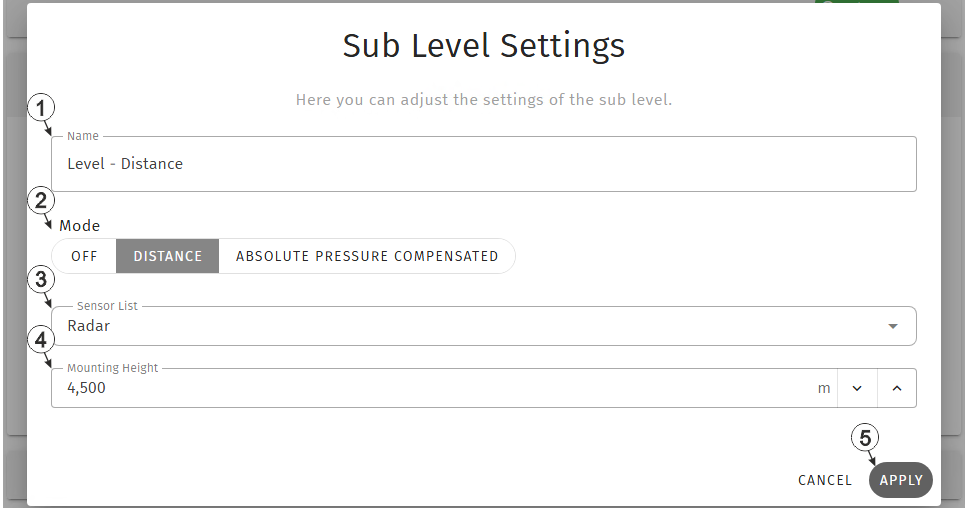
Input window "Sub level settings", mode "Distance"
| 1 | Freely selectable title that will be used for the measurement value of the sub level | |
| 2 | Selection of the mode to be used for calculation of the sub level | |
| Off | Calculation of the sub level deactivated | |
| Distance | The distance provided by the
sensor is subtracted from the mounting height
Sub level = mounting height - distance |
|
| Absolute pressure compensated | The sub level is calculated in
several stages:
Sub level = (pressure in the medium - atmospheric pressure) x 10,1936799 + nounting height Note: If the
water column level falls below the configured "minimum water level", the sub level
is not calculated but is set to 0.
|
|
| 3 | Selection of the measurement
value to be used as starting point for calculating the sub level. This can either be one of the Modbus measurement channels or the universal input. However, only measurement values for which the sensor type has been set to "Distance", i.e. measurement values that display a distance in meters, are displayed in the dropdown list. |
|
| 4 | Value
for the mounting height
Tip: Please note that if the measured value from one of the universal
inputs is used as the basis for calculating the individual level, the values in
the "Offset" and "Trim" input fields from the "Universal Input" input window have
already been added to the measurement value before the mounting height is factored
into the calculation of the sub level.
|
|
| 7 | Button to apply the
settings
Note: To save the settings,
the "Save" button below the "Smart Actions" configuration section must also be
clicked.
|
|

Input window "Sub level settings", mode "Absolute pressure compensated"
| 1 | Selection of the measurement value containing the
atmospheric pressure required to calculate the sub level This can either be one of the Modbus measurement channels or one of the universal inputs. However, only measurement values for which the sensor type has been set to "Pressure", i.e. measurement values that display a pressure value in bar, are displayed in the dropdown list. |
| 2 | Selection of the measurement value containing the
pressure in medium required to calculate the sub level This can either be one of the Modbus measurement channels or one of the universal inputs. However, only measurement values for which the sensor type has been set to "Pressure", i.e. measurement values that display a pressure value in bar, are displayed in the dropdown list. |
| 3 | Value
for the mounting height
This can either be one of the Modbus measurement channels or one of the universal inputs. However, only measurement values for which the sensor type has been set to "Pressure", i.e. measurement values that display a pressure value in bar, are displayed in the dropdown list. |
| 4 | Minimum water column height at which the calculation
of the individual water level is carried out As long as the level of the water column is below this threshold, the sub level is set to 0. |
| 5 | Button to apply the
settings
Note: To save the settings,
the "Save" button below the "Smart Actions" configuration section must also be
clicked.
|


