Sensor settings
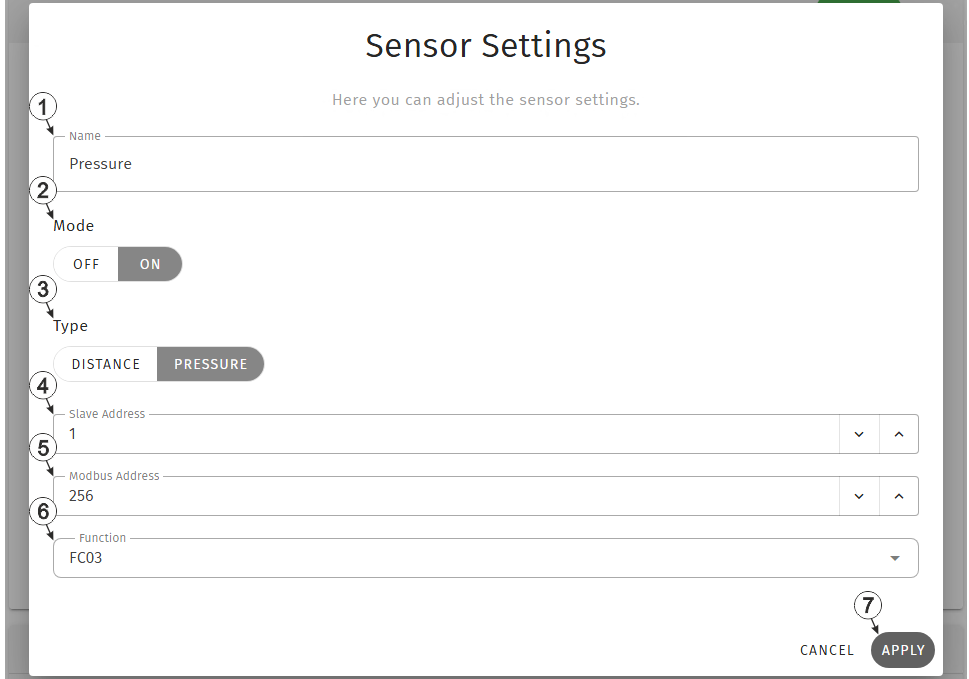
Input window "Sensor settings"
| 1 | Freely selectable designation for the measurement value determined using the Modbus measurement channel | |
| 2 | Selection whether the Modbus measurement channel should be active | |
| Off | Measurement channel deactivated | |
| On | Measurement channel activated | |
| 3 | Selection of the sensor type | |
| Distance | Distance sensor, i.e. the sensor provides a distance in metres | |
| Pressure | Pressure sensor, i.e. the sensor provides a pressure reading in bar | |
| 4 | Address from which the registers should be read. Two registers from the sensor are read at a time and interpreted as a 32-bit float with "HI-LO" word order (HI word at the lower register address, LO word at the higher register address). | |
| 5 | Address of the modbus server | |
| 6 | Function code to be used for accessing the register | |
| FC03 | Read Holding Registers | |
| FC04 | Read Input Registers | |
| 7 | Button to apply the
settings
Note: To save the settings,
the "Save" button below the "Smart Actions" configuration section must also be
clicked.
|
|


