Universal channel
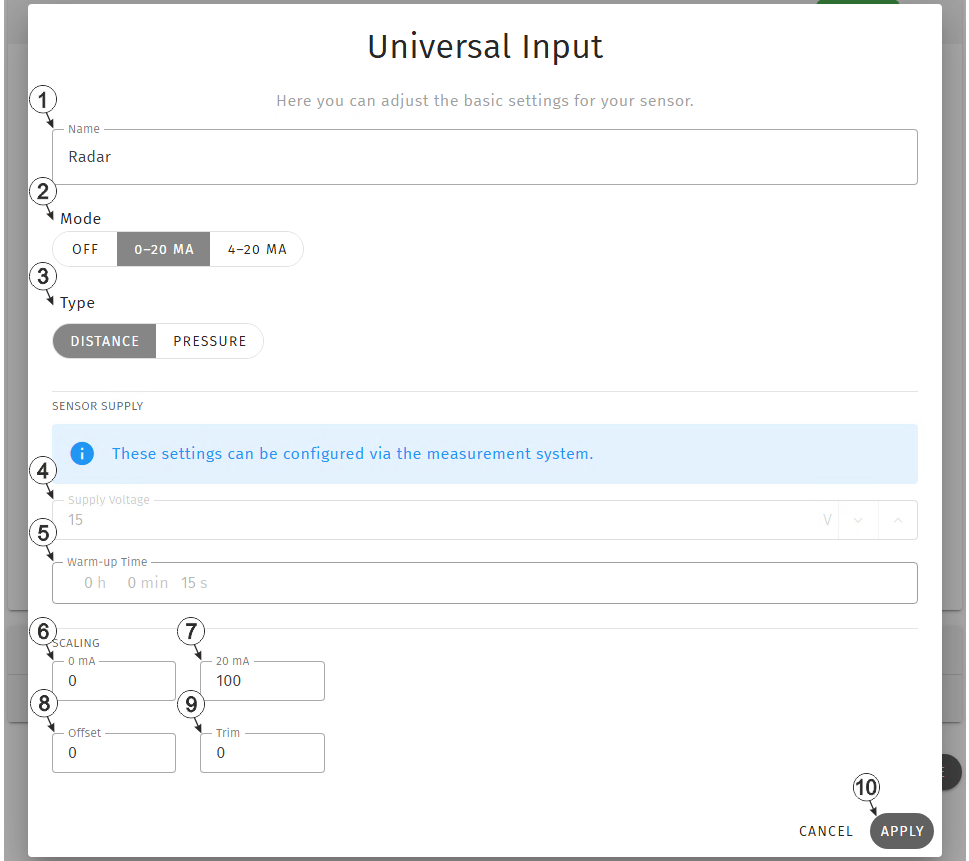
Input channel "Universal input"
| 1 | Freely selectable,
variable part of the designation for the measurement values determined using the
universl input Two measurement values are recorded using the universal input. Their name is made up of the variable part and a fixed part ("myName - measurement value" and "myName - raw value"). |
|
| 2 | Buttons to select the mode for the measurement channel | |
| Off | Measurement channel deactivated | |
| 0-20 mA | Valid input signal range 0...20 mA (0 mA = 0 %, 20 mA = 100 %) | |
| 4-20 mA | Valid input signal range 4...20 mA (4 mA = 0 %, 20 mA = 100 %) | |
| 3 | Selection of the sensor type | |
| Distance | Distance sensor, i.e. the sensor provides a distance in metres | |
| Pressure | Pressure sensor, i.e. the sensor provides a pressure reading in bar | |
| 4 | Currently selected output voltage for the sensor supply (read only) | |
| 5 | Time for which the sensor supply is switched on prior to measurement(read only) | |
| 6 | Start of the measurement range in the measurement unit | |
| 7 | End of the measurement range in the measurement unit | |
| 8 | Allows
to correct the measurement value by an offset value
The value entered here will be added to the measurement value. |
|
| 9 | Is
used to adjust the zero point
The value entered here will be added to the measurement value. |
|
| 10 | Button to apply the
settings
Note: To save the settings,
the "Save" button below the "Smart Actions" configuration section must also be
clicked.
|
|
Tip: The input fields "Offset" and "Trim" are only used to correct the measurement
value provided by the sensor. The input window "Offset" is therefore not intended for the
input of the mounting height. The mounting height should be entered in the input field
"Mounting height" of the input window "Sub Level Settings" (see Sub Level settings).


