Measurement system
In this configuration section, the basic settings for the device and the settings for the 4 inputs are made.
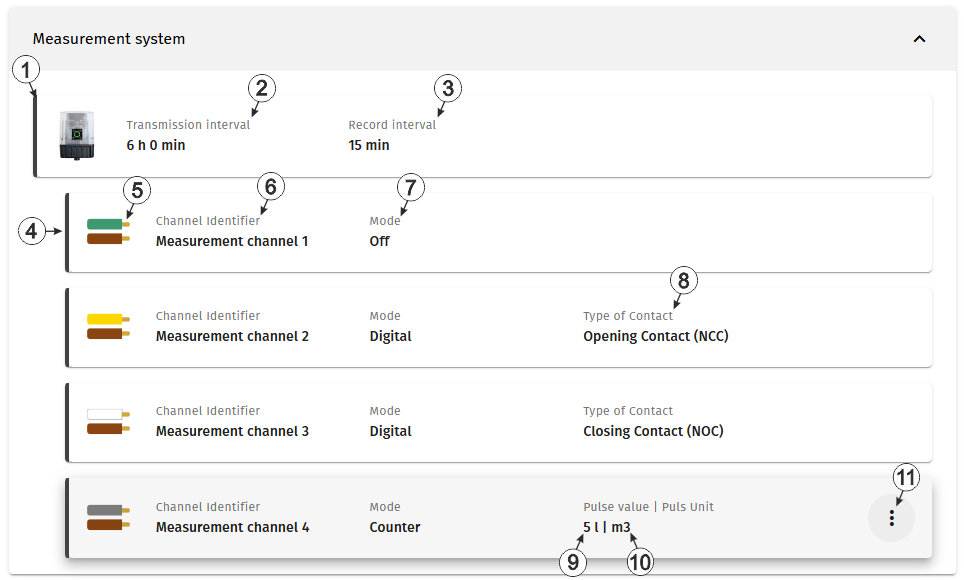
Configuration section "Measurement system"
| 1 | Information about the Jellox Pulse
currently linked to the site. The input window for the basic settings of the device is opened by clicking on this field (see Device settings). |
|
| 2 | Time between transmissions | |
| 3 | Time between measurement data recordings | |
| 4 | Information about the first
input. The input window for configuring the input is opened by clicking on this field (see Input in "Digital" mode and Inputs in "Counter" mode). |
|
| 5 | Colours of the pair of
wires for the input; the brown wire is the common ground. Tip: Only
applicable if the "Connection cable 7pin 8 m "
(301689) or the Connection cable 7pin 0,5 m "
(400442) is used. |
|
| 6 | Variable part of the Name
for the measurement values Several measurement values are recorded for each input. Their name is made up of the variable part and a fixed part that depends on the selected mode (e.g. "myName - contact position" and "myName - actuation state" for inputs in "Digital" mode). |
|
| 7 | Basic settings for the measurement channel | |
| Off | Measurement channel deactivated | |
| Digital | Digital input (Detecting the switching state of a digital contact) | |
| Counter | Infinite counter (Adding up the pulses of a water meter) | |
| 8 | Type of
contact connected to the input
Tip: The
following applies to both types:
|
|
| Opening contact | The contact is closed in idle state (i.e. current is flowing). When actuated, the contact opens. | |
| Closing contact | The contact is open in the idle state (i.e. no current flows). When actuated, the contact closes. | |
| 9 | Quantity (e.g. litres) that corresponds to a pulse of a connected meter. | |
| 10 | Unit (e.g. m³) in which the meter reading is to be displayed on the server interface. | |
| 11 | Opens the context menu for
adapting the meter reading according to the meter connected to the input (see Set meter reading). Tip: The meter
reading can only be set when Aloha‑mode is active. |
|


