Device settings
Basic settings
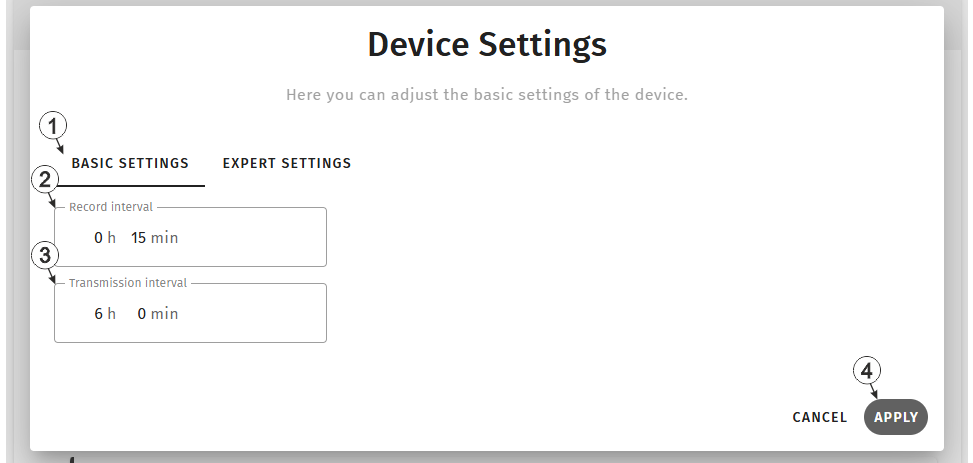
Input window "Device settings", tab "Basic settings"
| 1 | Buttons for switching between the individual tabs of the input window |
| 2 | Time between measurement data recordings |
| 3 | Time between transmissions |
| 4 | Button to apply the settings
Note: To save the settings, the "Save" button below the "Smart Actions" configuration
section must also be clicked.
|
Expert settings
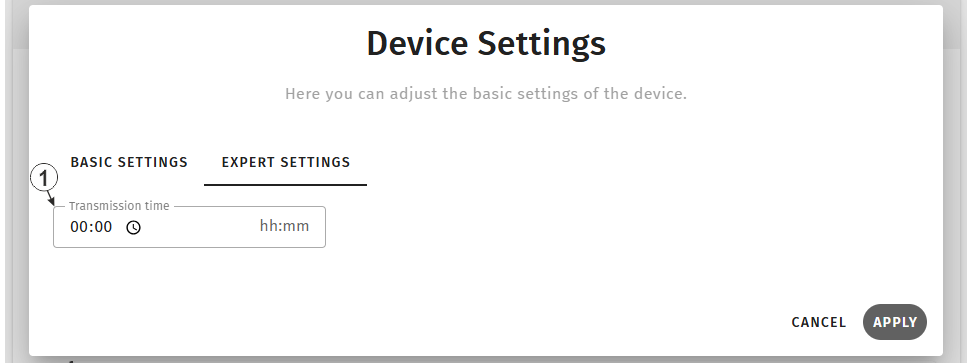
Input window "Device settings", tab "Expert settings"
| 1 | Time when the device establishes a connection to the
server, even if not in the transmission interval. If an additional transmission has been initiated, the internal meter of the device, that determines the time of the transmission, is reset. This means that the next transmission is completed exactly after the time specified via the "transmission cycle" parameter. |


