Inputs in "Counter" mode
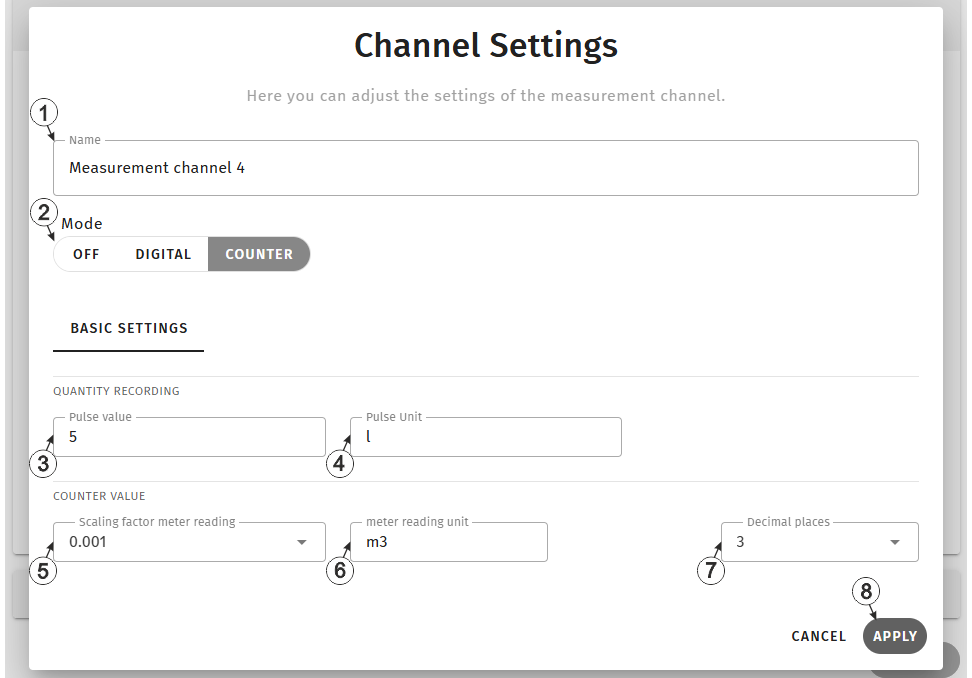
Input window "Channel settings", "Counter" mode
| 1 | freely selectable, variable part of the designation for the measurement values
For inputs in "Counter" mode, three measurement values are determined. Their name is composed of the variable part and a fixed part (e.g. "myName - Meter reading", "myName - Quantity" and "myName - Flow rate"). |
|
| 2 | Basic settings for the measurement channel | |
| Off | Measurement channel deactivated | |
| Digital | Digital input (Detecting the switching state of a digital contact) | |
| Counter | Infinite counter (Adding up the pulses of a water meter) | |
| 3 | Quantity (e.g. litres) that corresponds to a pulse of a connected meter. | |
| 4 | Unit (e.g. litres) used to specify the valence of the pulses of the meter connected. It hs no direct impact on the values. It is further used for the measurement value "Qantity per recording"1) by all of the server display elements. For the measurement value "Flow rate per recording"2) this unit is used and "/s" is added. | |
| 5 | Factor for the conversion of "Pulse unit" to "Unit of the meter reading" (example: factor 0,001 for litre -> m³) | |
| 6 | Unit (e.g. m³) in which the meter reading is to be displayed on the server interface. t has no direct impact on the values. | |
| 7 | Number of decimal places that are used by all of the server display elements | |
| 8 | Button to apply the settings
Note: To save the settings, the "Save" button below the "Smart Actions" configuration
section must also be clicked.
|
|
1) Sum of the pulses between two recordings multiplied by the pulse valence entered in the corresponding field
2) "Quatity per recording" divided by the time difference between the recordings
Additional information on configuring a meter input:
Assumption:The meter provides one pulse per 5 l. The meter reading should be displayed in [m³] on the server interface
| Parameter | Value |
|---|---|
| Pulse valence | 5 |
| Pulse unit | l |
| Conversion factor - meter reading | 0,001 |
| Unit of the meter reading | m³ |


