Input in "Digital" mode
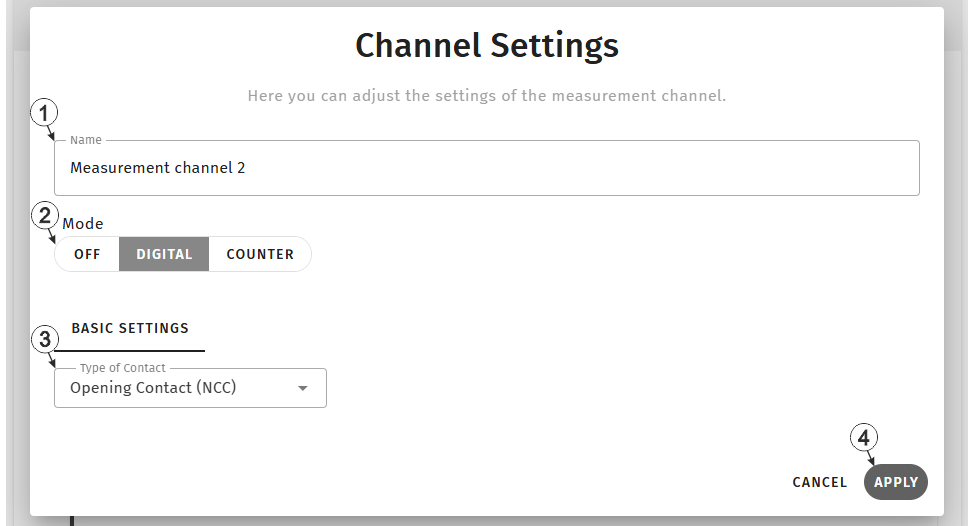
Input window "Channel settings", "Digital" mode
| 1 | freely selectable, variable part of the designation for the measurement values
For inputs in "Digital" mode, two measurement values are determined. Their name is composed of a variable part and a fixed part (e.g. "myName - contact position" and "myName - actutation state"). |
|
| 2 | Basic settings for the measurement channel | |
| Off | Measurement channel deactivated | |
| Digital | Digital input (Detecting the switching state of a digital contact) | |
| Counter | Infinite counter (Adding up the pulses of a water meter) | |
| 3 | Type of
contact connected to the input
Tip: The
following applies to both types:
|
|
| Opening contact | The contact is closed in idle state (i.e. current is flowing). When actuated, the contact opens. | |
| Closing contact | The contact is open in the idle state (i.e. no current flows). When actuated, the contact closes. | |
| 4 | Button to apply the settings
Note: To save the settings, the "Save" button below the "Smart Actions" configuration
section must also be clicked.
|
|


