Edit Smart Action
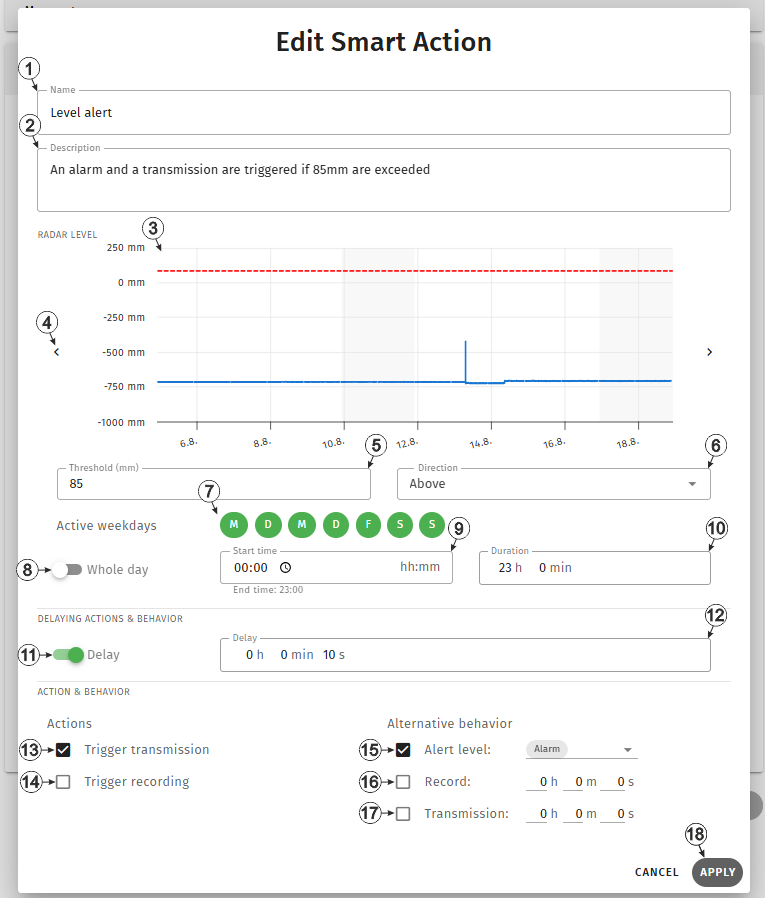
Input window "Edit Smart Action"
| 1 | Freely selectable name for the Smart Action | |
| 2 | Freely selectable
description for the Smart Action.
Tip: The description is displayed
in the list of Smart Actions. It should clearly explain the purpose or function
of the Smart Action.
|
|
| 3 | Section displaying the measuring curve of the measurement value to which the
condition is to be applied.
A course of two weeks is always displayed, whereby the period displayed always starts with the Monday of the previous week. This means that, depending on the current day of the week, no data is available for a certain area of the chart as this is in the future. However, the displayed period can be shifted by two weeks using the arrow symbols on the sides of the chart. |
|
| 4 | Shifts the displayed period by two weeks into the past or future | |
| 5 | Thresholds
for triggering the actions. The hysteresis for revoking the actions (e.g. all-clear
for alarm/warning) is 5% and cannot be changed (e.g. trigger action at 100 -> all
clear at 95).
The threshold is displayed as a red, dashed line in the section showing the measuring curve of the measurement value. |
|
| 6 | Condition under which the selected actions are triggered. | |
| Below | If the measurement value meets or falls below the threshold for triggering the action, the actions are triggered. | |
| Above | If the measurement value meets or exceeds the threshold for triggereing the action, the actions are triggered. | |
| 7 | Selection of the weekdays the Smart Action should be active on
Green: Smart Action is active on that day Grey: Smart Action is inactive |
|
| 8 | Selection of whether the Smart Action should be active all day (on the days selected under "Active weekdays") | |
| 9 | Selection of the time from which the Smart Action should be active (on the days selected under "Active weekdays")1). The end time ("Start time" + "Duration") is displayed below the input field. | |
| 10 | Selection of the duration for which the Smart Action should be active, strarting from the "Start time" (on the days selected under "Active weekdays")1) | |
| 11 | Selection of whether the action should only be triggered once the condition is fulfilled for a certain period of time. | |
| 12 | The actions are only triggered if the condition is fulfilled for longer than the time selected here. (Only visible if "Delay" is set to "on") | |
| 13 | Selection of whether a transmission is to be triggered at the time the condition is
fulfilled for the first time.
A transmission is then also triggered at the time the condition is no longer fulfilled for the first time. |
|
| 14 | Selection of whether a recording is to be triggered at the time the condition is
fulfilled for the first time.
A recording is then also triggered at the time the condition is no longer fulfilled for the first time. |
|
| 15 | Selection of whether an alarm or a warning is to be signalled as long as the
condition is fulfilled. You can use the drop-down list to choose between "Alarm" and
"Warning".
When signalling is activated, suitable actions are also activated automatically. If a warning is to be signalled when a condition is fulfilled, the "Trigger recording" action is activated. If an alarm is to be signalled when a condition is fulfilled, the "Trigger transmission" and "Trigger recording" actions are activated. Actions that have already been activated are not deactivated when the signalling is changed or deactivated. |
|
| 16 | Selection if instead of the record interval
determined in the "Device settings" (see Device settings ) an
alternative record interval is to be used. This alternative record interval can be
set via the input fields next to the checkbox.
Tip:
If several Smart Actions have been created for which the same measurement value but different thresholds are used, the alternative record interval of the Smart Action with the highest exceeded threshold (for "Direction" "Above") or the lowest value below the threshold (for "Direction" "Below") is used. If an alternative record interval has been defined for several Smart Actions that use different measurement values, the shortest of the intervals is used. For the Smart Actions using the same measurement value, a valid alternative record interval is first determined in the manner described above before the other Smart Actions are considered. |
|
| 17 | Selection if instead of the transmission
interval determined in the "Device settings" (see Device settings ) an
alternative transmission interval is to be used. This alternative transmission
interval can be set via the input fields next to the checkbox.
Tip: Which of the alternative
transmission intervals defined via the Smart Action is ultimately used is
determined in the same way as for the record interval.
|
|
| 18 | Button to apply the settings
Note: To save the settings, the "Save" button below the "Smart Actions" configuration
section must also be clicked.
|
|
1) Only visible if the Smart Action should not be active all day


