Device settings
Basic settings
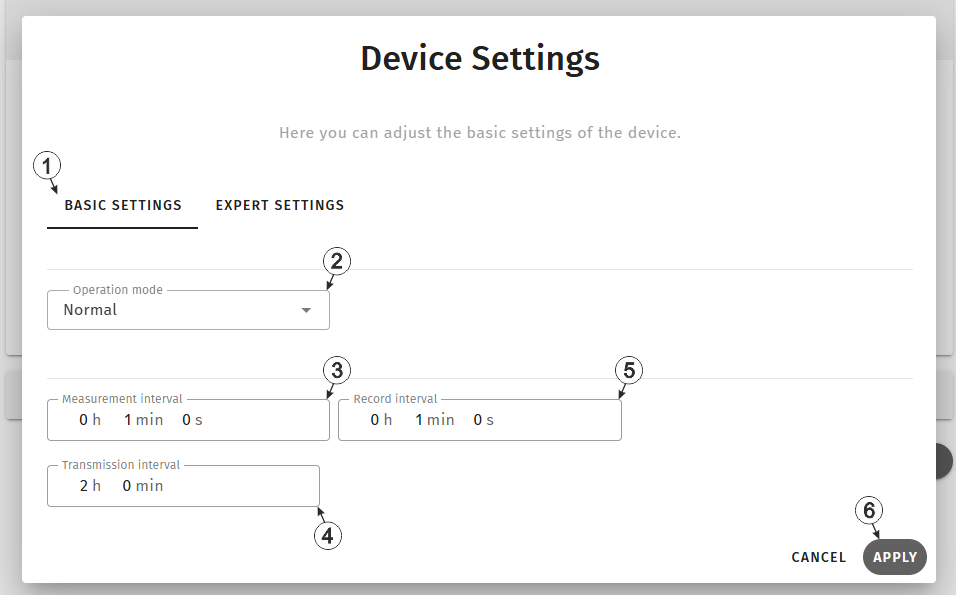
Input window "Device settings", tab "Basic settings"
| 1 | Buttons for switching between the individual tabs of the input window | |
| 2 | Selection of the operating mode | |
| normal | Operation in accordance with the configuration | |
| transport | Transport lock activated. This means that all of the operations (measurement, recording, transmission, etc.) are stopped to minimise energy consumption during transport or storage. | |
| 3 | Interval the internal measurement values are
determined in. (00:00 same as record interval) This interval is used to monitor the conditions under which a ‘Smart Action’ is triggered that uses one of the internal measurement values. Tip: If the measurement interval is
selected to be longer than the record interval, the measurements are carried out
in the record interval. |
|
| 4 | Time between transmissions | |
| 5 | Time between measurement data recordings | |
| 6 | Button to apply the settings
Note: To save the settings, the "Save" button below the "Smart Actions" configuration
section must also be clicked.
|
|
Expert settings
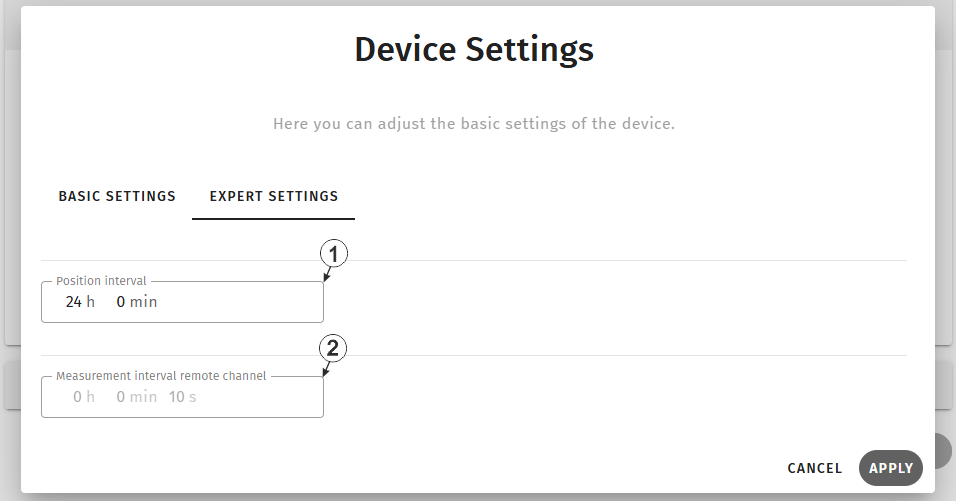
Input window "Device settings", tab "Expert settings"
| 1 | Position update interval (00:00 positioning is completed with every connection) | |
| 2 | Interval in which the
sensor modules carry out measurement. (Read Only) This interval is used to monitor the conditions under which a "Smart Action" is triggered that uses the primary measured value of one of the sensor modules. |
|


