Testing communication between Jellox Analog and myDatanet server (mobile network connection)
- Within the desired customer, create a new site/application for operation of the Jellox Analog on the myDatanet server (see Creating the site).
- Configure the created
site/application according to your requirements (see Site configuration).
The following settings should be carried out if you also want to test the communication with the sensor module for level measurement at the same time:
- Check or enter the installation height (see Remote sensor module of type LVL-R-5) or the offset of the sensor module (see Remote sensor module of type Gauge) in the relevant input field.
- Check or enter the value for the zero point adjustment in the input field for "Trimming" (see Remote sensor module of type LVL-R-5 or Remote sensor module of type Gauge).
The following settings should be carried out if you also want to test the communication with the sensor module for surface velocity measurement at the same time:
- Check or enter the mounting angle and flow direction (upstream or downstream) of the sensor module in the corresponding input field. (siehe Remote sensor module of type VEL-R-5).
The following settings should be made if you also want to test the measurement value acquisition at the mA input:
- If already known, enter the required offset in the corresponding input field (see Universal input).
- Ensure that the parameter "trimming" is set to 0 (see Universal input)
- Connect the antenna (see Connecting the mobile network antenna ).
- Connect the sensor (see Connecting the sensor).
- To establish a connection, activate setup mode (see Setup mode) using the reed switch. In doing so, the configuration of the site is also transferred to the Jellox Analog .
- Wait until it is indicated in the list of
sites/applications that the device is connected to the server (rotating
arrows).
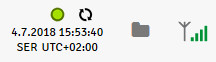
The Jellox Analog is only for a very short time connected to the server. You can therefore check if the time stamp of the last connection (under the green status symbol) has been updated.
- Wait until some measurement values have been recorded. The waiting time depends on the configured record interval (see Device settings )
- Trigger setup mode again to transmit the determined measurement values to the myDatanet server.
- Click on the "Direct Report" symbol in the list of sites/applications to display the
data saved on the myDatanet server.

- Check whether all of the data up to the point of the synchronisation is present and plausible (especially the "Remote measurement channels" and "GSM" measurement values). Complete a zero point adjustment, if the measurement values (sensor modules and/or sensor with mA output) do not meet the expectations (see Zero point adjustment).


