Connecting the mobile network antennas
- To ensure the correct functionality, only use antennas that are supplied by the manufacturer.
- When using extension cables, the total length of the cable connection to the antenna must not exceed 30 m.
Depending on the variant, the myDatalogEASY IoT ATEX disposes of up to 2 FME-Mantenna connections. The configuration is marked on each antenna connector. A list of available antennas can be found in chapter Antennas.
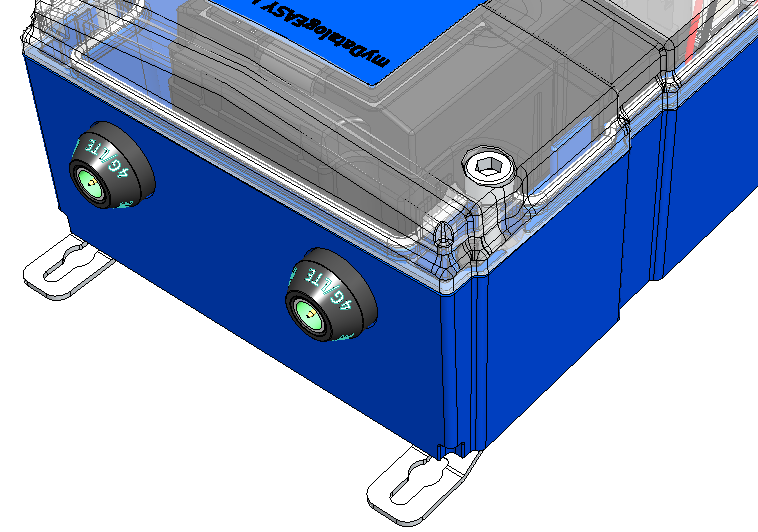
Antenna connectors of the myDatalogEASY IoT ATEX (e.g. myDatalogEASY IoT 2G/3G/4G World )
The standard antenna (Portable antenna multi band FME-F , 206.826) is attached directly to the antenna connector (see Front of the myDatalogEASY IoT ATEX ) of the myDatalogEASY IoT ATEX . In the event of a low radio signal strength, you can use the Dome antenna multi band FME-F 3m (301211) .
If the distance between the antenna position and the myDatalogEASY IoT ATEX is too great, you can use a 5 m Extension cable for antenna FME-F/FME-M 5m (206.805).
- Ensure that the myDatalogEASY IoT ATEX is de-energised.
- If you need an antenna extension, connect it to the antenna first.
- Connect the antenna extension or antenna directly to the antenna connector of the myDatalogEASY IoT ATEX (see Front of the myDatalogEASY IoT ATEX ).
Important: Do not apply too much force when tightening the antenna. Do not use any tools to tighten the antenna or antenna extension; only tighten it manually.
- Switch the voltage supply of the myDatalogEASY IoT ATEX back on.
- Check whether the connection to the myDatanet server has worked correctly (see Testing communication with the device).


