rapidM2M PlaygroundrapidM2M Playground
The rapidM2M Playground enables you to familiarise yourself with the API of the myDatanet server and to test the provided functions. One click on the "API" button will take you to rapidM2M Playground .

| 1 | Opens the rapidM2M Playground |
Overview
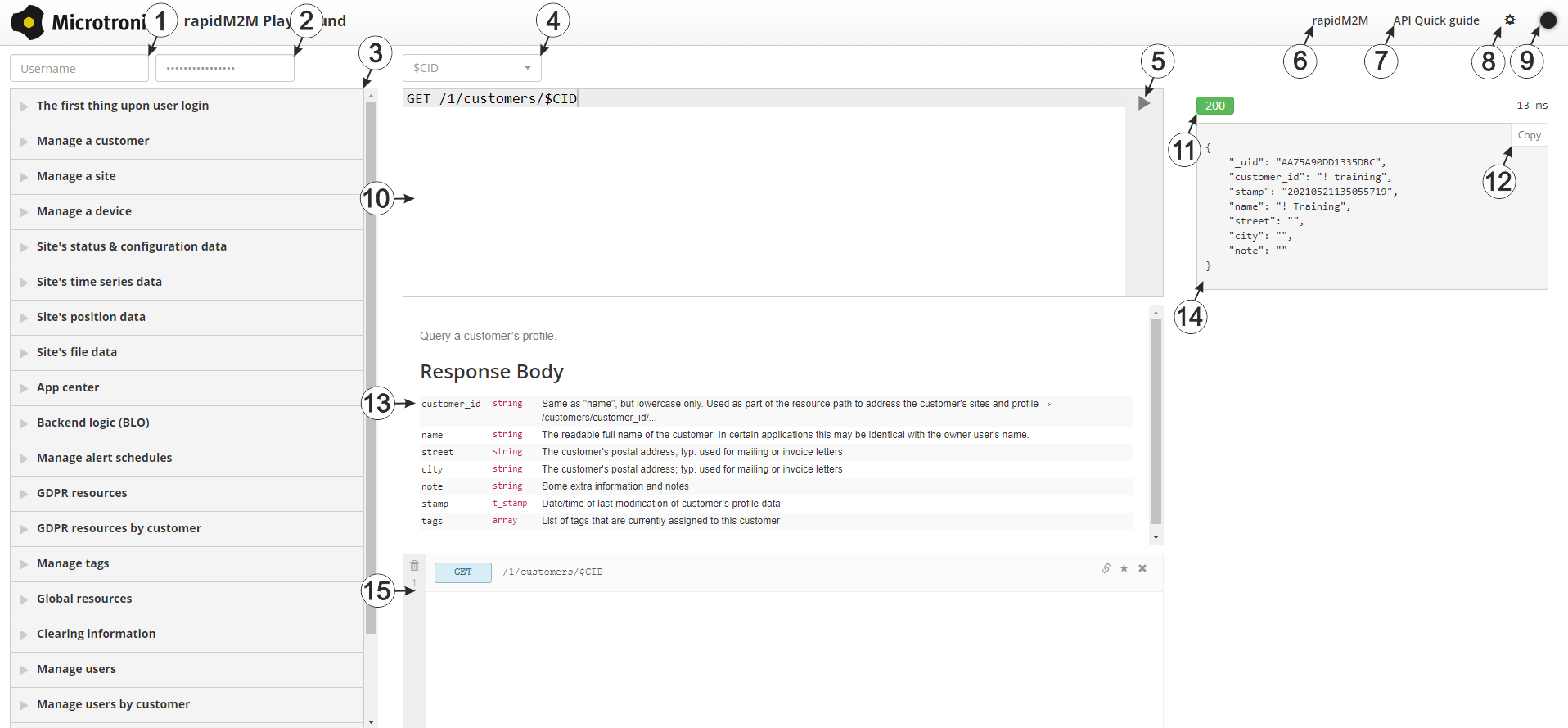
rapidM2M Playground
| 1 | Input field for the user name |
| 2 | Input field for the password |
| 3 | List of the available HTTP commands. The HTTP commands are grouped according to their fields of application. |
| 4 | Depending on the selected HTTP command, the drop down lists for selecting the customer, user and site that should replace the corresponding wild cards ("$CID"...customer , "$UID"...user, "$SID"...site) in the resource path of the HTTP command are displayed. |
| 5 | Button to execute the HTTP command |
| 6 | Opens the website "http://rapidm2m.com/" that includes additional information for developers |
| 7 | Opens the quick guide for the API |
| 8 | Button for displaying the menu that contains the global settings |
| 9 | Button to change the colour scheme of the rapidM2M Playground |
| 10 | Window displaying the selected HTTP command |
| 11 | Response code sent by the myDatanet server as an answer to the HTTP command |
| 12 | Copies the JSON object generated as a response to the HTTP command on to the clipboard |
| 13 | Window displaying the documentation for the selected HTTP command. Depending on the selected command, this includes a description of the action being executed, information that must be observed and a description of the request body and response body. |
| 14 | Window displaying the JSON object that is generated as a response to the HTTP command |
| 15 | Window displaying the last executed HTTP commands |


