Overview
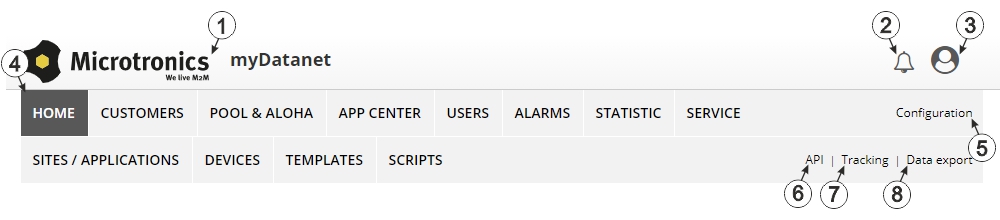
Overview of the myDatanet server
| 1 | Freely selectable logo | 5 | Opens the screen to input the global settings for the server |
| 2 | Opens the window in which the notifications created by the system and intended for the currently logged-in user are summarized | 6 | Opens the rapidM2M Playground |
| 3 | Displays the menu for adjusting the user settings and for logging out the currently active user | 7 | Switches to the "Data exports" area to configure the data export. This tab is only visible if at least the licence for one export variant is available. |
| 4 | Tabs to switch between the individual server areas | 8 | Opens the input screen to upload a XML file. This tab is only visible if the licence for the XML import is available. |


