Options
The settings for the COM ports to which the USB radio transmitter (206.657) or the USB Adapter (300685) are connected can be specified and the automatic search for the available firmware versions can be activated or deactivated via the "Settings -> Options" menu item.
The USB radio transmitter (206.657) is required for myDatanet devices that are connected to the PC via a wireless M-bus, while the USB Adapter (300685) is required for devices that are connected to the PC via local radio connection. Information on whether your device supports one of these connection methods is provided in the user manual for the respective device.
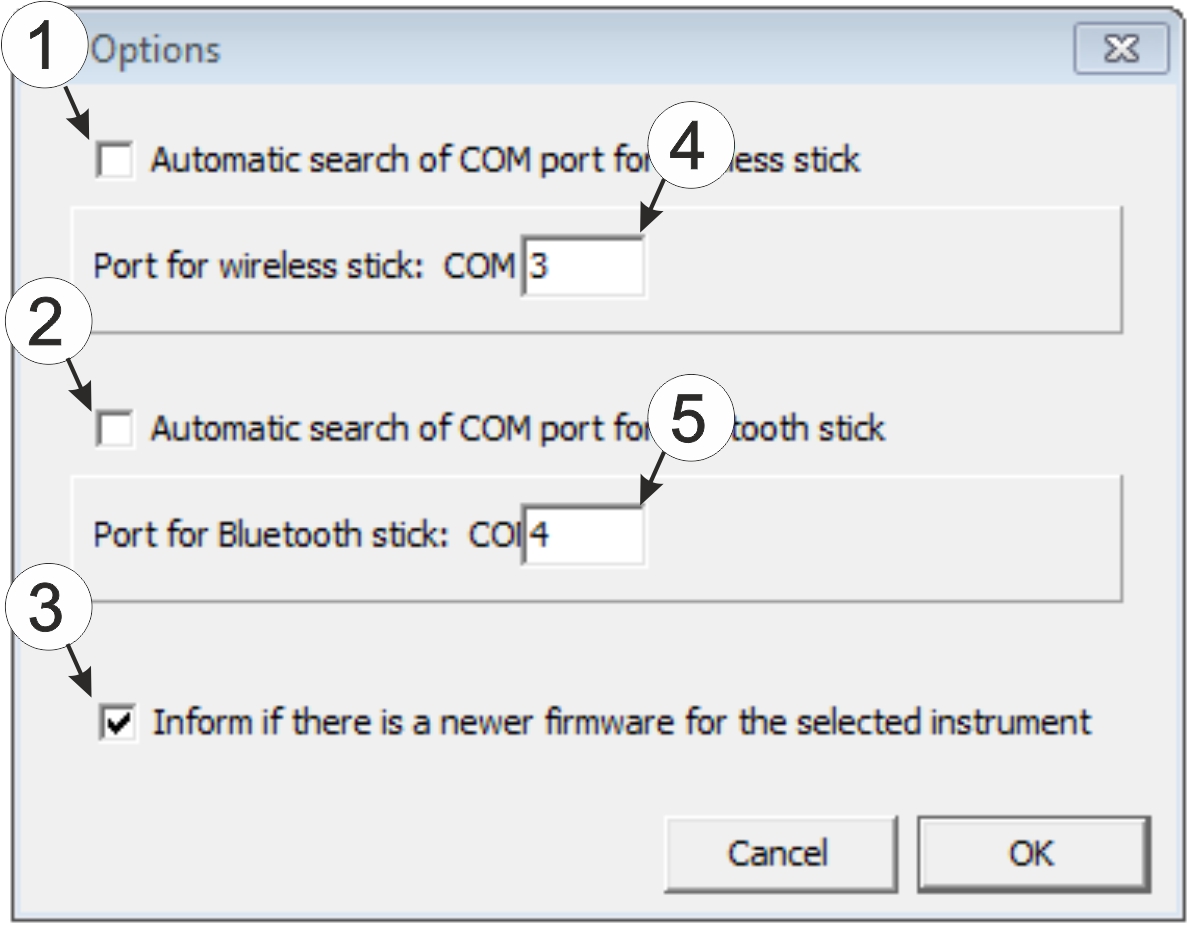
"Settings -> Options" menu item
| 1 | Activates/deactivates the automatic search for the USB radio transmitter (206.657) on all of the available COM ports | 4 | COM port that is connected with the USB radio transmitter (206.657) (only visible when the automatic search is deactivated) |
| 2 | Activates/deactivates the automatic search for the USB Adapter (300685) on all of the available COM ports | 5 | COM port that is connected with the USB Adapter (300685) (only visible when the automatic search is deactivated) |
| 3 | Activates/deactivates the automatic search for available firmware versions |


