"Sites / Applications" area at customer level
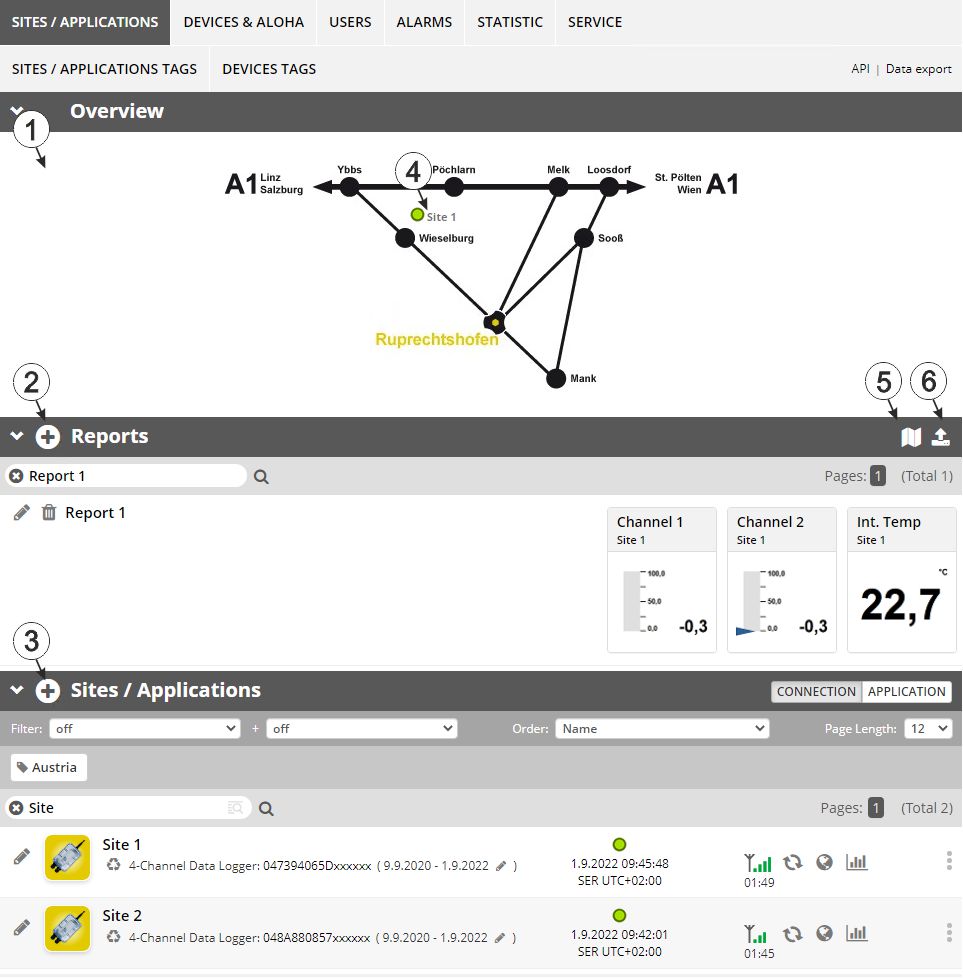
Overview of the "Sites / Applications" area at customer level
| 1 | Area
where an image file can be displayed as a "Map" and/or the
OpenStreetMaps map can be displayed
The sites can be manually placed on the image file used as a "map". In the OpenStreetMaps map, the sites are only displayed once GPS coordinates have been assigned to the site. |
| 2 | List of reports (see Reports) |
| 3 | List of sites/applications |
| 4 | Symbol that represents a site on the "Map" |
| 5 | Symbol via which a OpenStreetMaps map, on which the sites are displayed, can be loaded. (see Map view) |
| 6 | Symbol via which
an image file can be loaded on to the server as a "Map"
To remove the "Map" again, open the upload dialogue again and click on "Submit" without selecting an image file beforehand. |


