Site
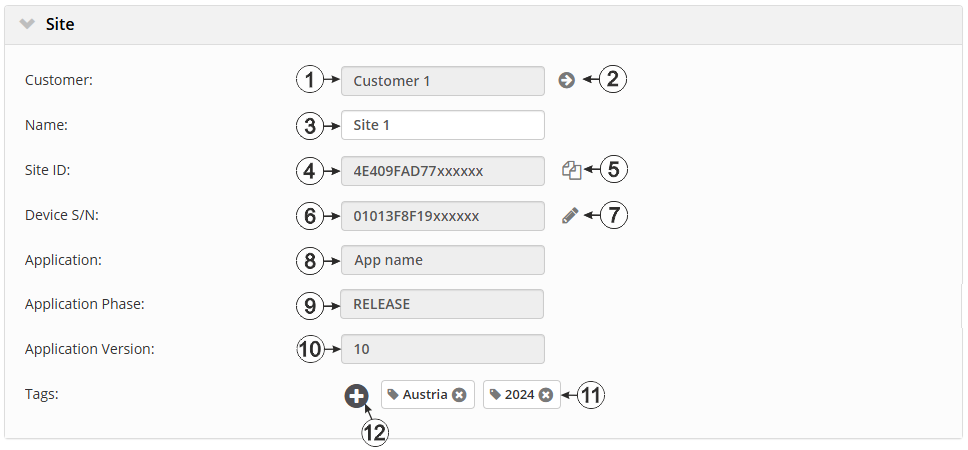
Confiuration section "Site"
| 1 | Specifies to which customer the site is assigned | |
| 2 | Assign site to another customer | |
| 3 | Site designation (not relevant for the device or data assignment) [2-50 characters] | |
| 4 | Unique ID of the site. It is required to access the site via REST API or OPC UA. | |
| 5 | Copies the unique ID of the site to the clipboard | |
| 6 | Serial number of the device that is linked to the site (device assignment!) | |
| 7 | Opens the input screen to edit the link. It can be
used to assign another device or generally cancel the assignment (i.e. the site is
then no longer linked to any device)
The measurement data is assigned to the site and not to the linked device. If a device is replaced, all data (measurement values and configurations) are retained. The site is only assigned a different device by changing the serial number. From this moment on, the site receives the measurement data from the newly assigned device. |
|
| 8 | Name of the IoT application based on which the site was created | |
| 9 | Release process phase of the currently used version of the IoT application | |
| RELEASE | The version is released for all customers. | |
| RC | All internal tests have been successfully completed. However, the version is only released for selected test customers. | |
| 10 | Version number of the IoT application that is currently installed on the site. If the version number of the site is not the same as the version number of the device logic installed on the device then the version number of the device logic installed on the device is displayed in addition to the version number of the site. | |
| 11 | List of tags already assigned to the site. The assignment can be cancelled by clicking on the cross next to the name of the tag. | |
| 12 | Opens the input screen for assigning tags | |


