Basic settings
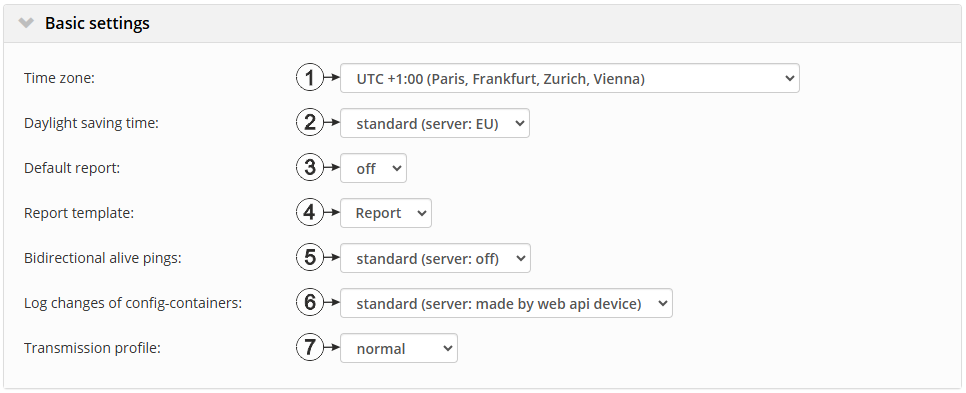
Configuration section "Basic settings"
| 1 | Regional settings (not relevant for raw measurement data as this is stored in UTC) | |
| 2 | Configuration for automatic time adjustment (only displayed if a time zone other than "Standard" has been selected) | |
| Standard | The configuration for the time adjustment is adopted by the global server setting. | |
| Off | Automatic time adjustment deactivated | |
| USA | Predefined setting for the American area | |
| EU | Predefined setting for the European area | |
| 3 | Selection of the report that is loaded by clicking on the device link in the maps | |
| Off | No report is loaded. | |
| "Name of a report" | The selected report is loaded. | |
| 4 | Selection of the report template used to display the data when clicking on the symbol to display the measurement data, which is located in the list of sites/applications. Only the report templates in which the site/application type of the first wild card is compatible with the site/application that is currently being edited are displayed in the dropdown list. The symbol to display the measurement data is only displayed in the list of sites/applications if a report template has been selected. | |
| (not assigned) | The symbol to display the measurement data is not displayed in the list of sites/applications. | |
| "Name of a report template" | Name of the report template used to display the measurement data | |
| 5 | Using "Bidirectional alive ping", both the device and the server can easily recognise whether the online connection is still active. | |
| standard | The configuration for the bidirectional alive ping is adopted from the global server settings | |
| off | "Bidirectional alive ping" is deactivated | |
| on | "Bidirectional alive ping" is activated. I.e. the server responds correspondingly to each keep alive ping of the device. | |
| 6 | Selection of which changes to the configurations should be logged | |
| web api | Changes that were implemented via the server interface or REST-API are logged. | |
| web device api | Changes that were implemented via the server interface, by the device itself or the REST-API are logged. | |
| 7 | The site can be customised to specific requirements (energy consumption, error diagnosis, connection stability) via the transmission profiles. In addition to operations carried out purely by the server (e.g. requesting the device log during synchronisation), the setting also affects procedures stored in the device firmware (e.g. retry behaviour in the event of connection interruptions). The procedures in the firmware that are affected by the selected transmission profile depend on the device type and the respective firmware version. | |
| Normal | Operation by default | |
| ECO | Low energy consumption, low data volume | |
| Diagnosis | Extended logging for troubleshooting | |
| Adaptive | Stable connection even at the expense of energy consumption | |


