Alarm settings
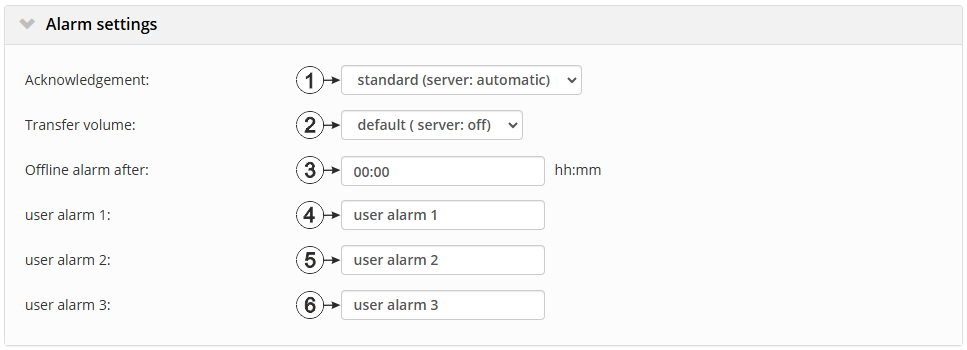
Configuration section "Alarms"
| 1 | Selection of how the alarms should be aknowledged | |
| Standard | The global server setting is used to determine whether alarms must be acknowledged automatically or manually | |
| automatic | Alarms are acknowledged automatically as soon as all of the messages have been sent. If SMS that have a tariff with a delivery confirmation function have also been sent, acknowledgement is provided after delivery confirmation. | |
| manual | Alarms must be acknowledged by the user. | |
| 2 | Selection of how the alarm for the transfer volume should be handled | |
| Standard | The setting for the transfer volume alarm is taken from the global server settings | |
| off | The transfer volume alarm is deactivated. | |
| individuell | The level at which the transfer volume alarm should be triggered can be entered in the adjacent field in KiB. | |
| 3 | alarm in the event that the device does not report for longer than the set time (00:00 alarm deactivated). | |
| 4 | Freely selectable title for user-defined alarm 1. If the user-defined alarm 1 is triggered by a device connected to the site, the server will use this text to signal the alarm. The same applies to user-defined alarm 2 and 3. | |
| 5 | Freely selectable title for user-defined alarm 2 | |
| 6 | Freely selectable title for user-defined alarm 3 | |


