Errors and notifications
If certain operating states or errors occur, corresponding messages are displayed in the areas with status information about the sensor modules. Notifications are always displayed in blue, while errors are displayed in red.
Firmware update

Firmware of the sensor module is being updated
| 1 | Firmware of the sensor module is being updated |
If required, the update for all PRE‑PT‑D30 sensor modules assigned to a measurement channel of the Jellox Pulse is executed automatically. No user interaction is required. The update process may take several minutes. If the firmware of a PRE‑PT‑D30 sensor module is being updated, "NaN" is recorded for all measured values of all remote sensors because the update process blocks communication with the other sensor modules. If the myDatanet server interface is accessed during the update, the message shown in the figure above is displayed in the configuration section "Measurement system".
Error on the sensor module
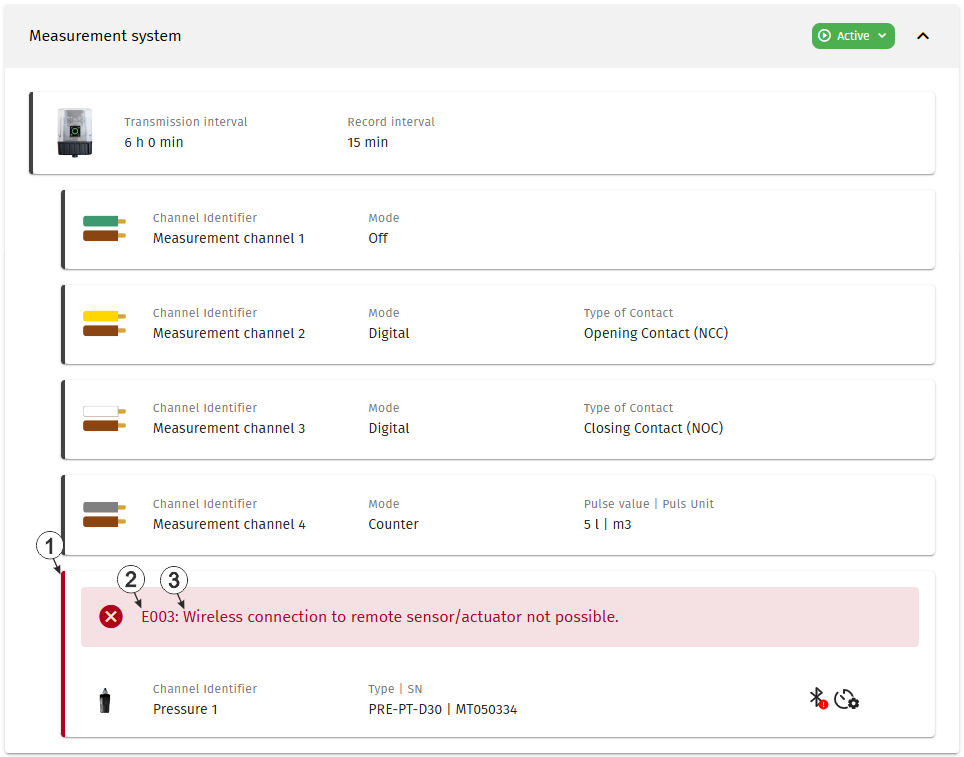
Error occurred on one of the sensor modules
| 1 | Status information about the sensor module currently linked to the first measurement channel |
| 2 | Error code An exhaustive list of possible error codes is provided in "Error codes" at the end of this chapter. |
| 3 | Error description |
The error codes are displayed separately for each sensor module in the status information section of the respective sensor module.
Error codes
| Error code | Description |
|---|---|
| E001 | sensor configuration not permitted for this variant |
| E002 | last mobile network connection failed |
| E003 | radio connection to remote sensor/actuator not possible |
| E020 | no valid measurement value |
| E150 | hardware error (contact the manufacturer) |


