"GSM" tab
This tab provides the option of switching between the integrated SIM chip and an external SIM card inserted in the SIM slot. If the external SIM card has been selected then the APN settings (APN, username and password) and the PIN code (if required by the SIM card) can be entered via this tab and transferred to the 4-Channel Data Logger . Here it is possible to either enter the APN settings manually or to select one of the providers from the drop-down list and thus to use the settings stored for the provider in the DeviceConfig .
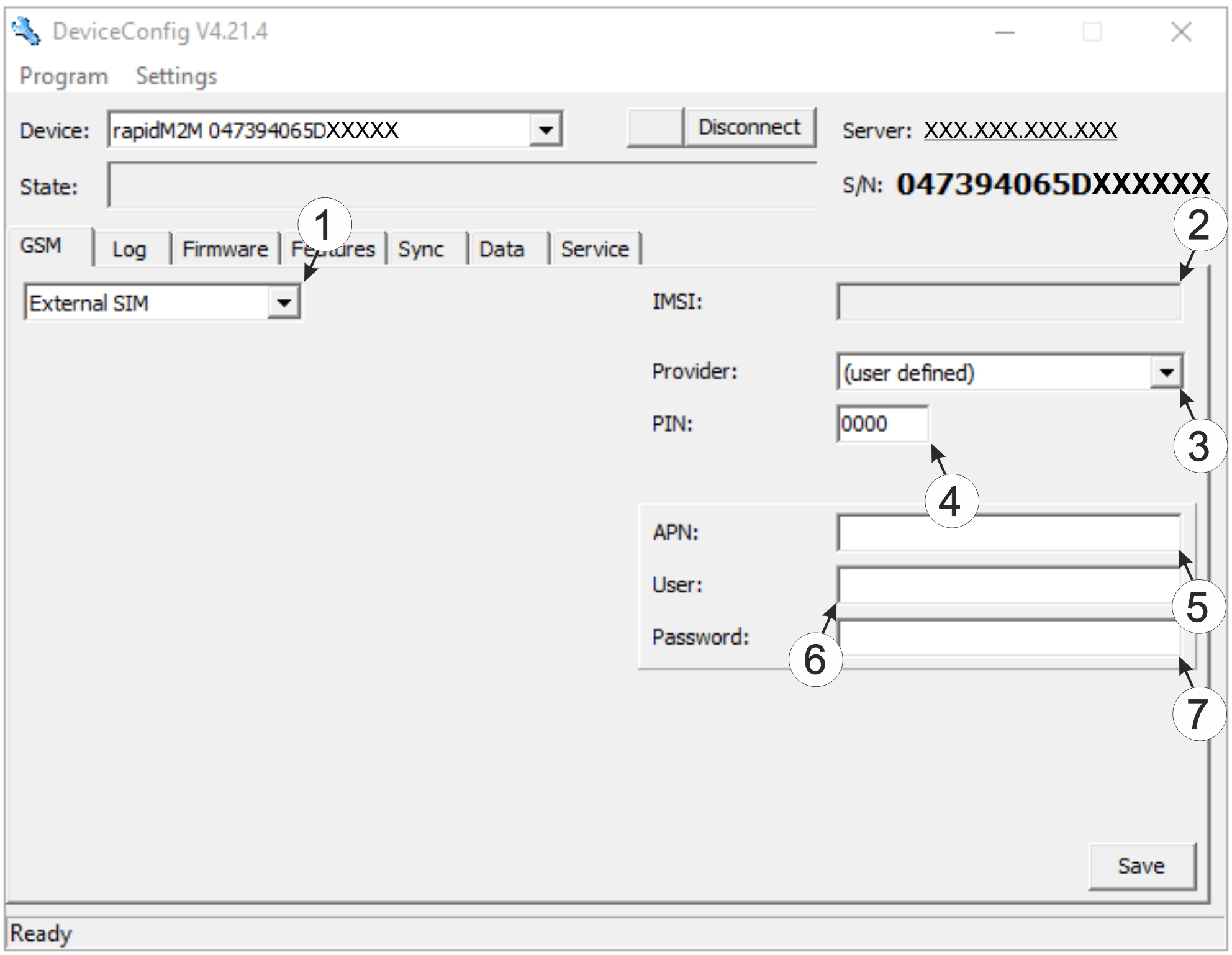
"GSM" tab
| 1 | Drop-down list for selecting whether the internal SIM chip or the external SIM card should be used Note: If "Internal SIM" has been selected then all other selection fields are hidden. |
| 2 | IMSI of the external SIM card inserted in the SIM slot |
| 3 | Drop-down list for selecting the provider from which the external SIM card has been delivered Note: The input fields for "APN", "user" and "password" for manual input of the APN settings are only displayed if the "(user defined)" entry has been selected in this drop-down list. |
| 4 | PIN code |
| 5 | Access point (APN) that should be used for the connection |
| 6 | User name for dial-up via the access point |
| 7 | Password for dial-up via the access point |


