Basic settings
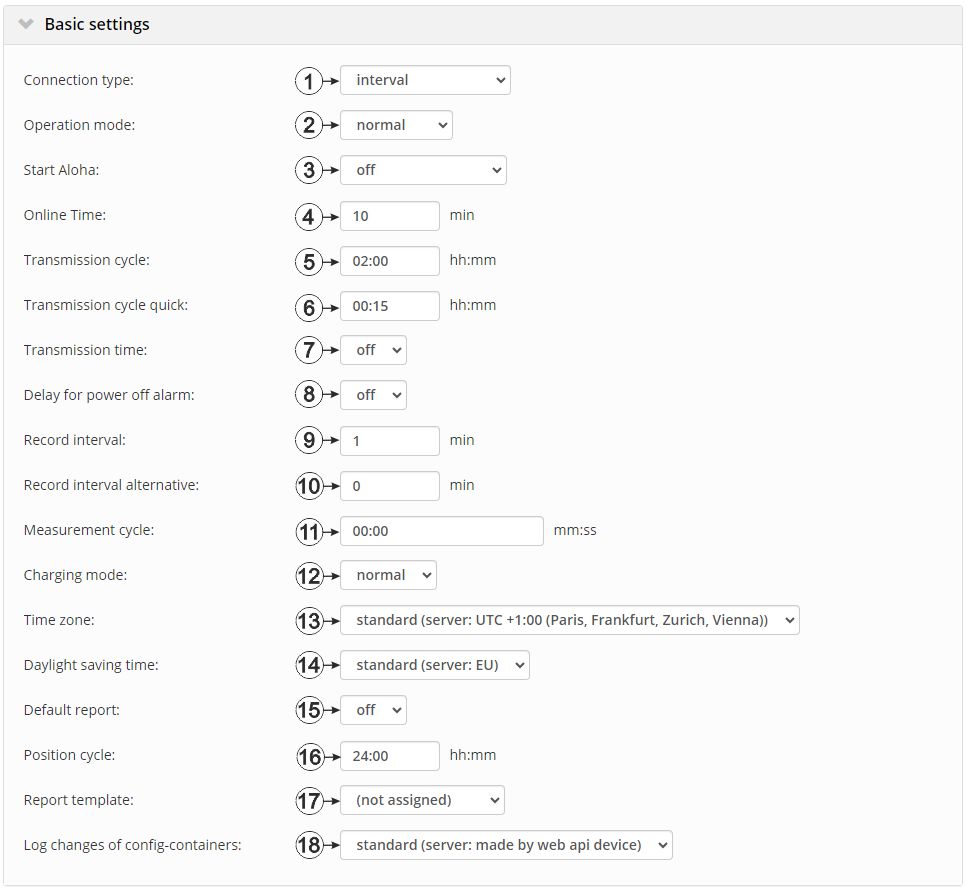
"Basic settings" configuration section
| 1 | Selection of the connection type | |
| Interval | The device connects in the transmission cycle. | |
| Interval & wakeup | The device connects to the server in the transmission
cycle and can be placed into Aloha transmission mode via the server.
|
|
| online | The device does not disconnect the connection and continuously transmits the measurement data. However, every 7 days, the connection is temporarily interrupted in order to verify the server assignment. | |
| 2 | Selection of the operating mode | |
| normal | Operation in accordance with the configuration | |
| transport | Transport lock activated. This means that all of the operations (measurement, recording, transmission, etc.) are stopped to minimise energy consumption during transport or storage. | |
| 3 | Selection of how the device should react to a wakeup via the server interface (i.e. upon receipt of a wakeup SMS) | |
| Off | Only a standard connection is established. | |
| Once | An Aloha transmission is executed once immediately after the standard connection is established. This parameter is then set to "Off" by the device. | |
| On | During the next connection, the device switches to test mode for the time specified via the "Online time" parameter. An Aloha transmission is also triggered immediately after the standard connection is established. | |
| 4 | Duration of the Aloha connection | |
| 5 | Time between transmissions | |
| 6 | Time between the transmissions, if a alternative transmission cycle should be used because of a trigger being initiated | |
| 7 | Selection of whether a connection to the server should be established every day at a firmly defined time | |
| Off | No additional transmissions | |
| On | The adjacent option can be used to determine the time at which the device establishes a connection to the server regardless of the transmission cycle.
If an additional transmission has been initiated, the internal meter of the device, that determines the time of the transmission, is reset. This means that the next transmission is completed exactly after the time specified via the "transmission cycle" parameter. |
|
| 8 | Selection of whether an alarm should be triggered in the event of a supply voltage failure | |
| Off | No alarm generated in the event of a supply voltage failure | |
| On | A relevant alarm is only triggered if the supply voltage has failed for longer than the time configured here. This prevents alarms from being triggered in the event of brief supply voltage failures. However, an entry is always added to the device log.If the time is set to 0, an alarm is generated every time the supply voltage fails. | |
| 9 | Time between measurement data recordings | |
| 10 | Time between measurement data recordings, if an alternative record interval should be used because of a trigger being initiated | |
| 11 | Time between measurements (00:00 same as record interval) | |
| 12 | Selection of the charging mode | |
| Off | Charge control deactivated | |
| Normal | The charge control is activated and the rechargeable battery is charged to the maximum voltage if the state of charge of the rechargeable battery for the power supply unit falls below 50%. The charge control is then deactivated again. This is designed to optimise the service life of the rechargeable battery. | |
| Solar | The rechargeable battery of the power supply unit is charged to the maximum voltage if the supply or charging voltage V IN exceeds 16 V The charge control then remains deactivated for 12 hours unless the state of charge of the rechargeable battery for the power supply unit drops below 95%. This charge strategy is recommended if a solar field is used to charge the rechargeable battery. | |
| 13 | Regional settings (not relevant for raw measurement data as this is stored in UTC) | |
| 14 | Configuration for automatic time adjustment (only displayed if a time zone other than "Standard" has been selected) | |
| Standard | The configuration for the time adjustment is adopted by the global server setting (see "myDatanet Server Manual " 805002). | |
| Off | Automatic time adjustment deactivated | |
| USA | Predefined setting for the American area | |
| EU | Predefined setting for the European area | |
| 15 | Selection of the report that is loaded by clicking on the device link in the maps | |
| Off | The default graphic is loaded. | |
| "Name of a report" | The selected report is loaded. | |
| 16 | Position update interval (00:00 positioning is completed with every connection) | |
| 17 | Selection of whether the default graphic or a report template to display the data is used when clicking on the symbol to display the measurement data located in the site/application list. Only the report templates in which the site/application type of the first wild card is compatible with the site/application that is currently being edited are displayed in the dropdown list. | |
| (not assigned) | The default graphic is used to display the measurement data. | |
| "Name of a report template" | Name of the report template used to display the measurement data | |
| 18 | Selection of which changes to the configurations should be logged | |
| web api | Changes that were implemented via the server interface or REST-API are logged. | |
| web device api | Changes that were implemented via the server interface, by the device itself or the REST-API are logged. | |
Tip: Additional explanation about the connection types
| Connection type | Energy consumption | Data volumes | Response time |
|---|---|---|---|
| online |  |  |  |
| Interval & wakeup | | | |
| Interval | | | |


