Smart Actions
This configuration section can be used to manage the Smart Actions. This includes creating new Smart Actions and activating/deactivating, configuring or deleting existing Smart Actions.
Smart Actions can be used to automatically trigger certain actions or change the behaviour of the data logger depending on the current measurement value. This allows a response to events such as excessive flow rates. The actions to be carried out or the alternative behaviour can be defined individually. Actions, such as triggering a transmission, are carried out when the measurement value falls outside the normal range. An alternative behaviour, such as a shortened transmission interval or an active warning message, is retained as long as the measurement value is outside the normal range. To ensure fast response times, all operations required for Smart Actions are carried out directly on the data logger.
Smart actions are therefore rules that the user can create individually to define the data logger's reactions to specific events. These rules relate to the recording, transmission and creation of warning and alarm messages.
|
|
| How-To-Video: Introducing "Smart Actions" |

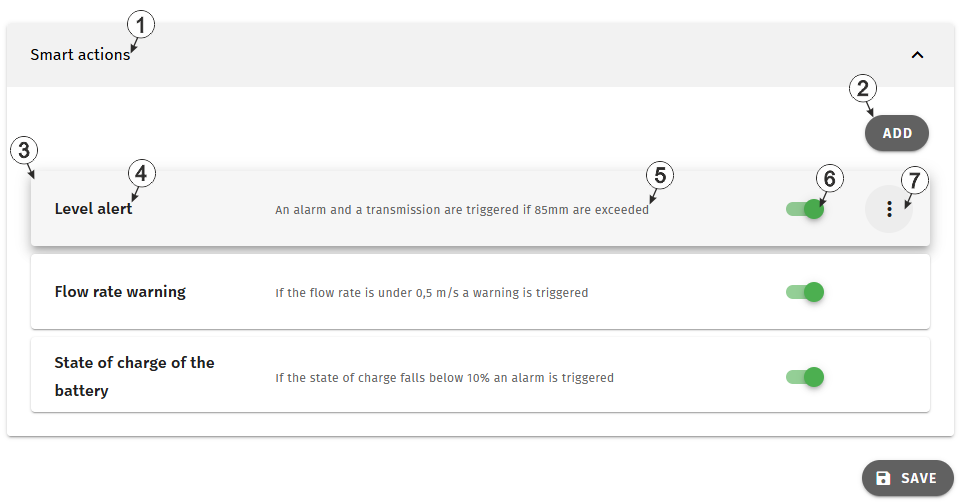
Configuration section "Smart Actions"
| 1 | List of Smart Actions |
| 2 | Button to add another Smart Action Tip: Up to 25 Smart Actions can be created. Once the maximum has been
reached, the button is greyed out. |
| 3 | Information about a Smart Action By clicking on tis field, the input window for editing the Smart Action is opened (see Edit Smart Action). |
| 4 | Name of the Smart Action |
| 5 | Description of the Smart Action |
| 6 | Toggle to generally activate/deactivate the
Smart Action. When a Smart Action is deactivated, all active actions are withdrawn
(e.g. all-clear for alarm/warning).
Note: To save the settings, the "Save" button below the "Smart Actions" configuration
section must also be clicked.
|
| 7 | Opens the context menu where the Smart Action can be removed. If a Smart Action is removed, active actions are cancelled (e.g. all-clear for alarm/warning). |


